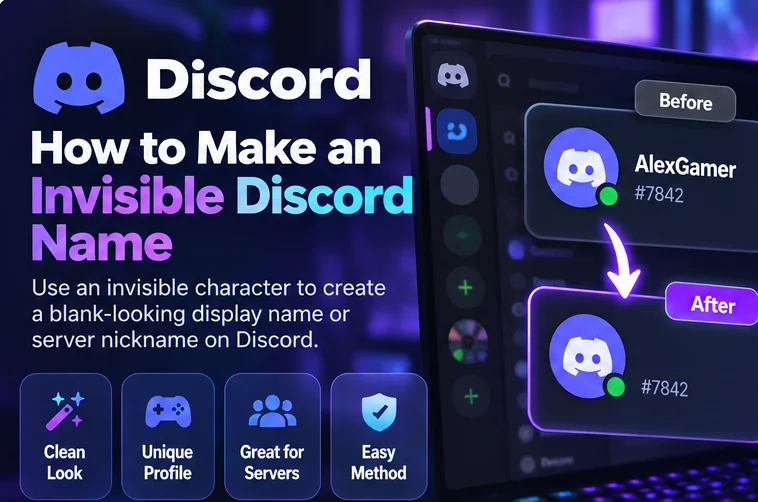
Want an invisible Discord name that makes your profile look minimalist? You can try a special Unicode character to create a blank-looking display name or server nickname. Unlike an ordinary keyboard space, some Unicode characters appear empty while remaining actual text. Whether Discord accepts them depends on its current validation rules.
Quick method: Visit the BlankyText invisible character tool, copy Hangul Filler (U+3164), open Discord's profile settings, and try pasting it into your Display Name. Save and check the result if Discord accepts it. If it is rejected, restore a readable name rather than repeatedly submitting invalid input.
This guide explains the difference between Discord's three name types, the desktop and mobile steps, which Unicode characters to test, and how to troubleshoot failures.
Can You Have an Invisible Name on Discord?
Sometimes a name can look blank, but that is not the same as having no name. An empty field contains zero characters; a blank-looking name contains a Unicode character that produces little or no visible glyph. Discord can reject both empty fields and particular Unicode characters. There is no universally reliable invisible-name method.
Hangul Filler (U+3164), for example, often looks like empty space in fonts. It is still a real character. If a Discord name field accepts it, the result may look blank on some devices. On others, Discord may reject it, strip it, or display something unexpected.
Discord Username vs. Display Name vs. Server Nickname
| Name type | What it means | Invisible-character expectations |
|---|---|---|
| Username | Unique account identifier | Restricted character set; invisible Unicode is not a valid standard username choice |
| Display Name | Visible profile name | More flexible, but blank-looking characters may be rejected |
| Server Nickname | Name shown in one server | Subject to server permissions and Discord validation |
Discord Username Rules
Discord's standard usernames use a restricted set of characters, including lowercase Latin letters, digits, underscores, and periods, with additional rules. Hangul Filler and Braille Pattern Blank do not belong to that allowed set. Do not confuse an invisible display name with an invisible username.
Display Names and Invisible Characters
A display name is the visible name associated with your profile. It supports more characters than a username, but Discord still applies rules. A Unicode character that looks blank may or may not be accepted. If saved, your account's username can still appear elsewhere.
Server Nicknames and Permissions
A server nickname can differ from your display name and is specific to one community. You need permission to change it. Moderators can enforce server rules, and a nickname accepted in one context may not be allowed in another.
How to Make Your Discord Display Name Invisible
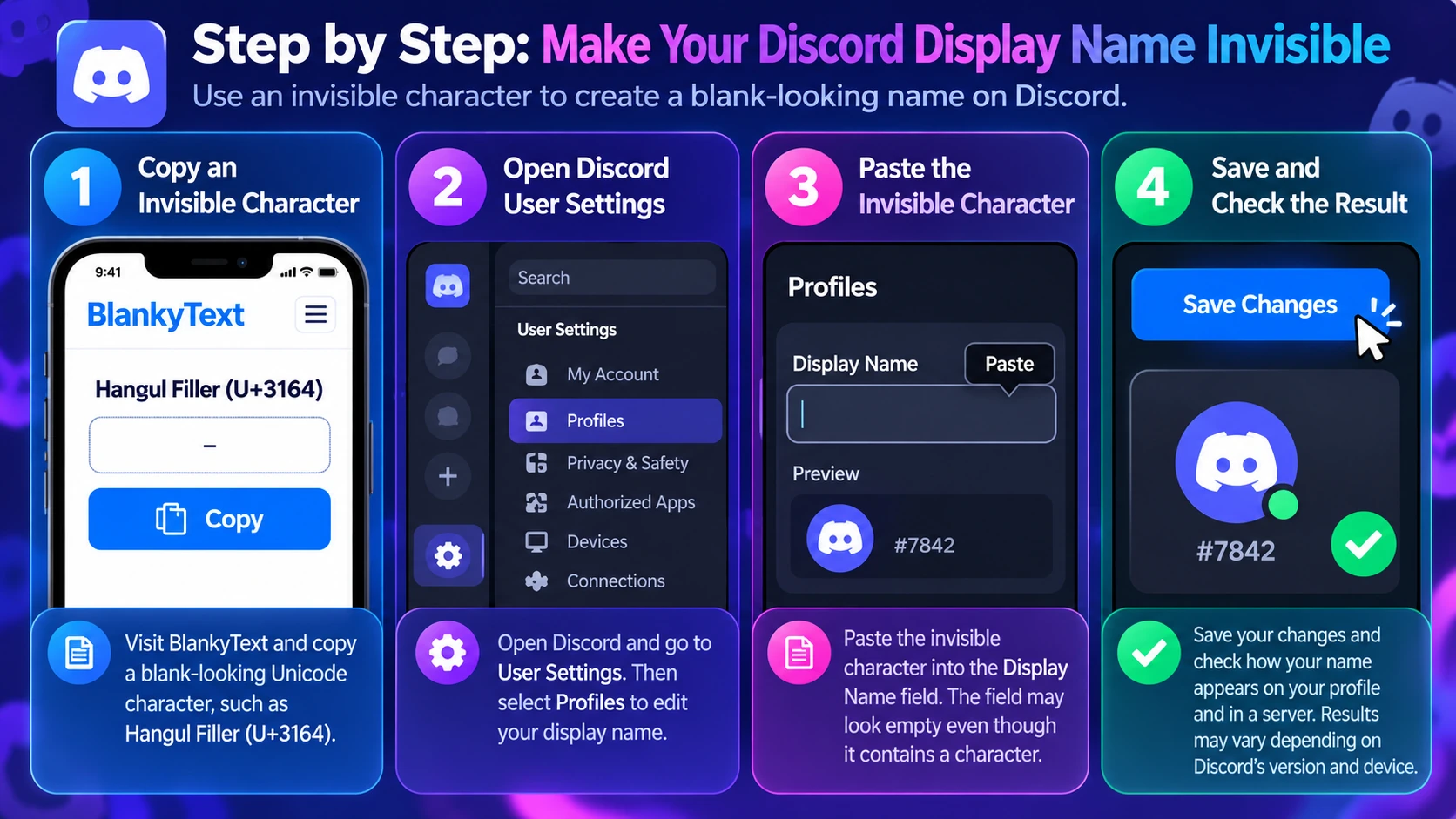
Step 1: Copy an Invisible Character
Open BlankyText and copy **Hangul Filler (U+3164)**. The clipboard contains a character even if you cannot see it. Start with one character, not a long sequence. Pressing the normal spacebar is not equivalent: the keyboard space is U+0020 and is often trimmed from name fields.
Step 2: Open Your Discord Profile Settings
Desktop: Open Discord, select the settings gear, and navigate to Profiles or the profile-editing section. Find Display Name, not Username.
Mobile: Open Discord, tap your account/profile area, choose the profile editing controls, and find Display Name. Menu labels and positions can change as the app is updated.
Step 3: Paste the Invisible Character
Remove the visible display name and paste the character. The field may appear empty. If the app immediately removes it or displays a validation error, the character is not accepted there. Avoid adding dozens of invisible characters in an attempt to force it through.
Step 4: Save and Check the Result
Save the changes if Discord permits it. Open your profile and check how the name renders. Also look at a server or direct-message view. Discord may still show your username, and other devices may render the character differently. Saving a blank-looking display name does not make your account anonymous.
How to Try an Invisible Server Nickname
1. Open the server in which you want a different nickname.
2. Find Edit Server Profile, Change Nickname, or the equivalent option in your current Discord interface.
3. If you have permission, paste a single blank-looking character into the nickname field.
4. Save, then check the result inside that server.
If the nickname setting is unavailable, you may lack permission. If the character is rejected, you can test an alternative once or use a visible nickname. Follow your server's moderation rules; server administrators may require recognizable names.
Best Invisible Unicode Characters for Discord
Unicode characters that look empty are not interchangeable. They have different properties, and Discord may handle them differently.
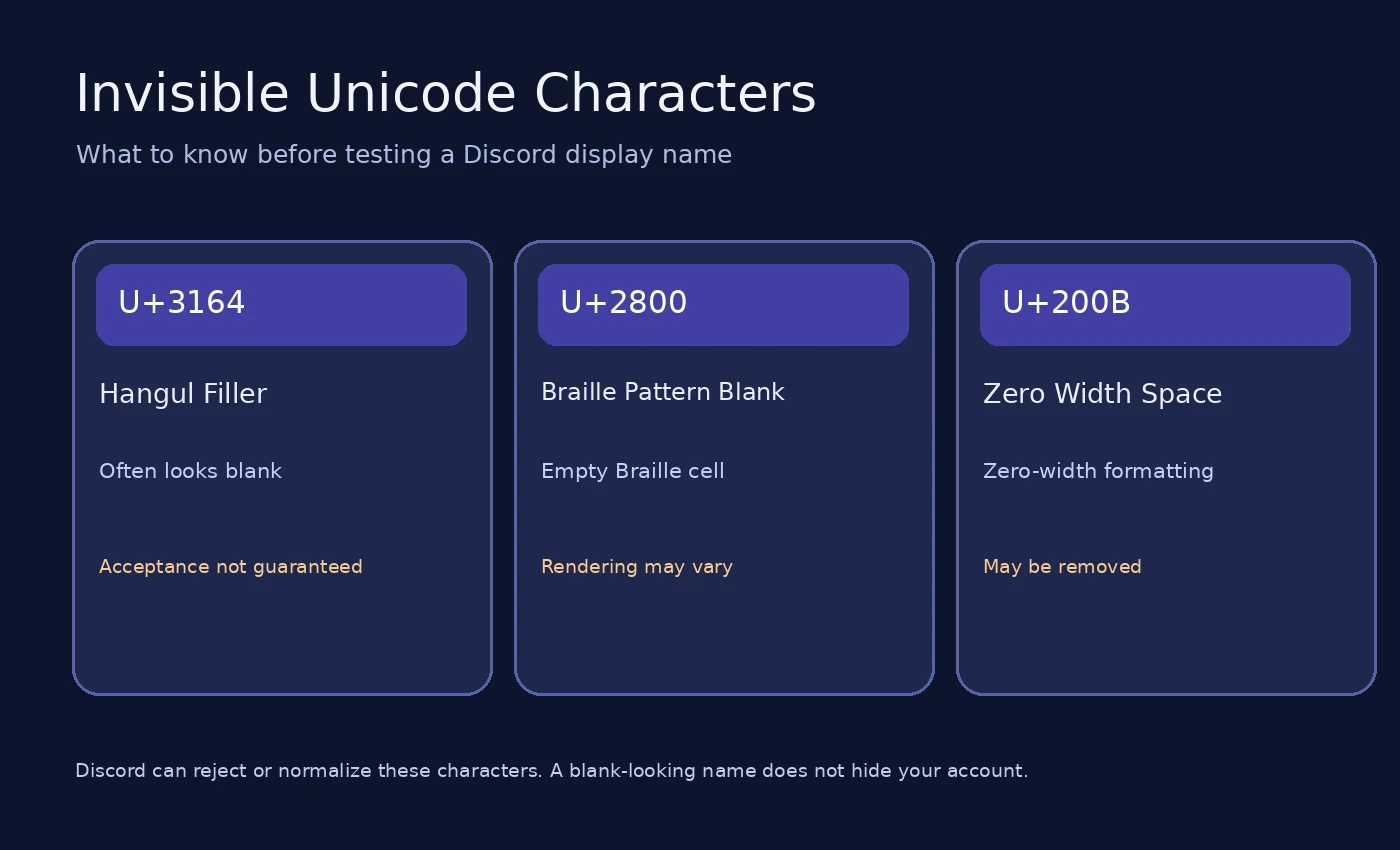
| Character | Code point | What it does | Consideration |
|---|---|---|---|
| Hangul Filler | U+3164 | Blank-looking Hangul compatibility character | First character to test; not guaranteed to be accepted |
| Braille Pattern Blank | U+2800 | Represents an empty Braille cell | Alternative; rendering and acceptance vary |
| Zero Width Space | U+200B | Zero-width formatting character | May be stripped or normalized |
| Regular space | U+0020 | Ordinary word separator | Often trimmed or treated as empty input |
Hangul Filler (U+3164)
Hangul Filler is in the Hangul Compatibility Jamo block. It often appears as a blank area but is not the standard space character. Its distinct Unicode classification makes it useful to test in text fields, not a guaranteed way around Discord's rules.
Braille Pattern Blank (U+2800)
Braille Pattern Blank is an empty Braille cell. It commonly appears blank in fonts that support it. Because its properties differ from Hangul Filler, a field may handle it differently. It can also render as an unexpected glyph on some systems.
Zero Width Space (U+200B)
Zero Width Space is a formatting character with no normal visual width. It can signal a possible text-wrapping opportunity. Some applications remove zero-width characters, so using it alone in a name field is unpredictable.
Why Doesn't a Normal Space Work?
Many applications trim leading and trailing spaces or reject input consisting only of whitespace. Unicode characters that appear blank may be processed differently, but Discord's validation rules still apply.
Why Is My Invisible Discord Name Not Working?
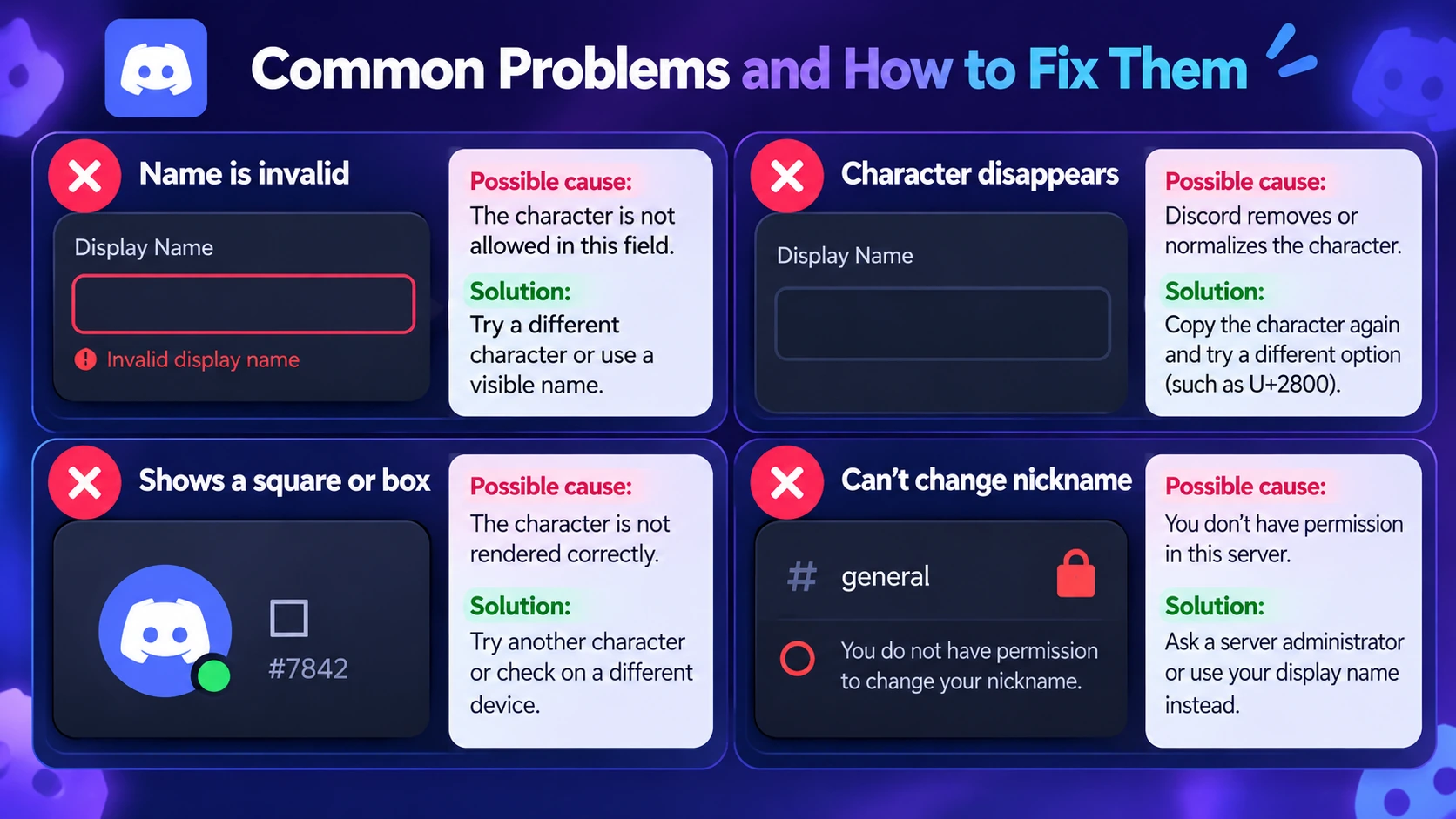
Discord Says the Name Is Invalid
You may be editing the Username rather than the Display Name, or the character may be disallowed. Check the field, copy the character again, and try a different blank-looking character if appropriate. If it is still rejected, use a readable name.
The Invisible Character Disappears
Discord may remove or normalize it. Paste the character into a plain-text editor to confirm that it was copied, then test again. If Discord consistently strips it, it is unsupported in that field.
My Name Appears as a Square or Box
This is usually a font or rendering issue. Try a different character or restore a visible name. Test on another device if consistent display matters.
My Username Still Appears
Display names and usernames are separate. A blank-looking display name does not hide the unique account identifier or other profile information.
I Can't Change My Server Nickname
Your server may not allow members to edit their nicknames. Ask a moderator if you need clarification; do not try to bypass permissions.
My Nickname Reverts to the Previous Name
The character may have failed validation, or a moderator or moderation system may have changed it. Check whether your save succeeded and follow server requirements.
It Looks Different on Mobile and Desktop
Unicode rendering varies across fonts, operating systems, and app versions. A character that appears blank on one device may look different on another.
Invisible Discord Names: Limitations and Safety
Invisible Does Not Mean Anonymous
An invisible-looking name does not conceal your account, username, messages, or activity. It is a visual customization experiment, not a privacy or security feature.
Respect Server Rules
Some communities require readable names so conversations and moderation remain manageable. Even if Discord accepts the character, moderators may ask you to change it.
Consider Accessibility
Blank names can make it harder for people using screen readers and other assistive technologies to identify speakers. A short, readable name is usually better in active communities.
Avoid Impersonation and Untrusted Tools
Do not use blank-looking names to confuse users or impersonate others. You do not need to enter your Discord password into a third-party site to copy Unicode characters. Use a simple copy tool, not an extension or login page promising a guaranteed invisible username.
Frequently Asked Questions
Can I make my Discord username invisible?
Not with the standard username character rules. Invisible Unicode characters are not valid standard username choices. You can test a display name or server nickname instead, but acceptance is not guaranteed.
How do I copy an invisible character for Discord?
Visit BlankyText, copy a blank-looking Unicode character, and paste it into the relevant display-name or nickname field. Save only if Discord accepts it.
What is the best invisible character for Discord?
Hangul Filler (U+3164) is a reasonable first test. Braille Pattern Blank (U+2800) is an alternative. Neither is guaranteed to work.
Does an invisible Discord name work on mobile?
You can try the method on mobile, but Discord must accept the character, and rendering may differ from desktop.
Can I use an invisible server nickname?
You can test a blank-looking nickname if the server permits you to edit it. Discord or server rules may still reject or replace it.
Why does Discord reject my invisible name?
The selected field may not allow that Unicode character, or Discord may remove it during validation. Confirm you are editing the correct name type.
Will people still be able to identify my account?
Yes. Your username and other Discord account information can still be available even when a display name appears blank.
Can I use multiple invisible characters?
You can test them, but more characters do not guarantee acceptance and can create unpredictable spacing or rendering.
Are invisible Discord names permanent?
Not necessarily. Discord can change its rules, and server moderators can change nicknames when permitted.
Final Thoughts
An invisible Discord name is a Unicode formatting experiment, not a guaranteed Discord feature. The safest approach is to understand which name field you are editing, try one blank-looking character, and respect any validation error or server restriction.
Start with **Hangul Filler (U+3164) or try Braille Pattern Blank (U+2800)** as an alternative. Copy the character from the free BlankyText invisible text tool, test it in your display name or server nickname, and check how it appears on different devices. If Discord rejects it, use a readable name instead.